


Receiving shared files
There are two ways a file reaches you: someone invites your email address, in which case it appears in Shared with me, or someone sends you a link.
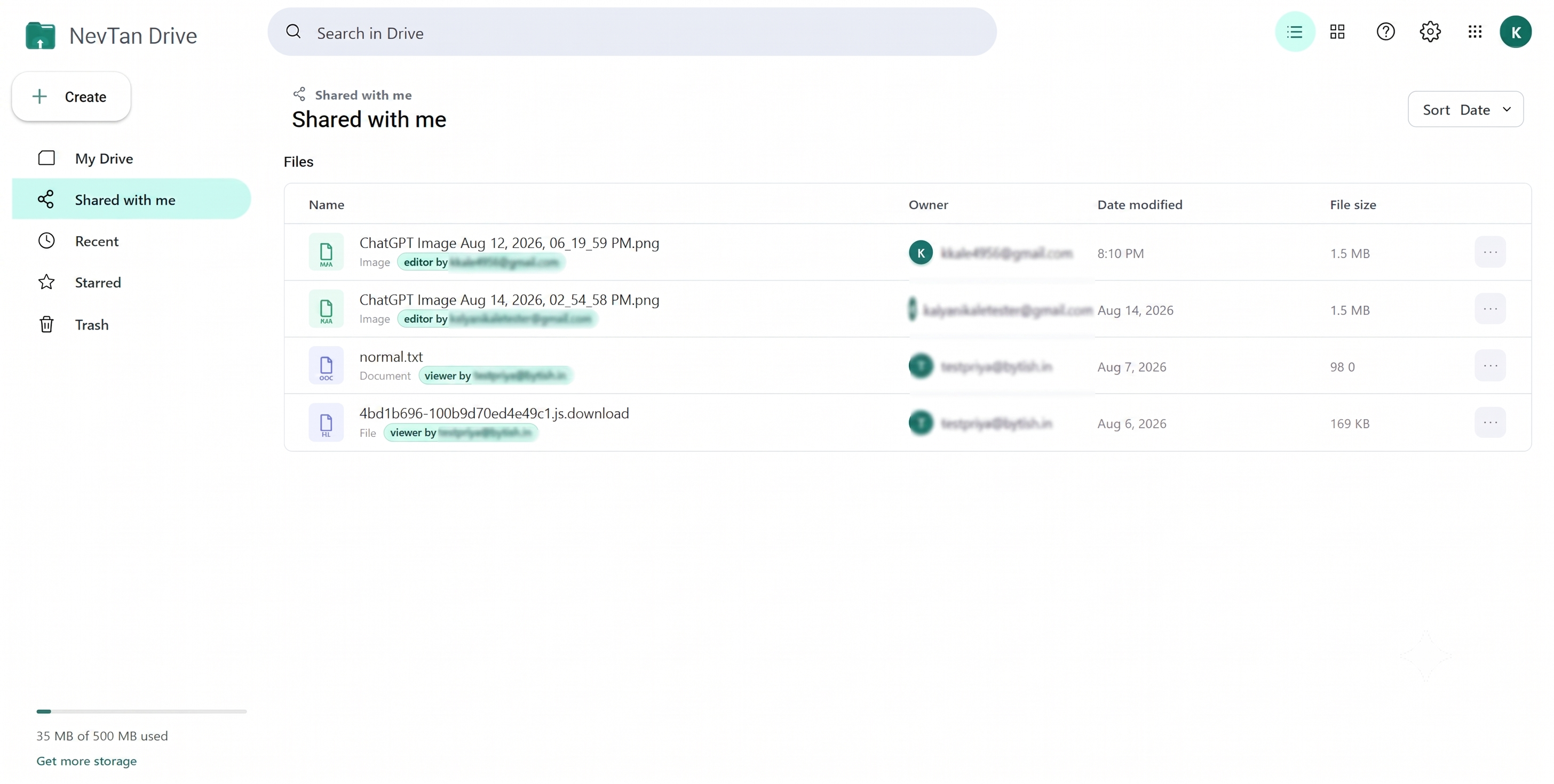
Shared with me
Shared with me in the sidebar lists every file other people have given your account access to. Each row shows who shared it and what you are allowed to do with it.
- Your role decides which actions appear — a viewer sees Open and Download, an editor also sees Edit and Rename.
- You cannot delete, move, or re-share these files. Only the owner can.
- Files shared with you also appear alongside your own in My Drive, with the owner shown in the Owner column.
Opening a share link
A share link looks like https://drive.nevtan.com/drive/share/<token>. What happens when you open it depends on the role the owner attached to the link:
| Link role | What you get |
|---|---|
| Viewer | The file opens in a read-only preview with a Viewer access badge. |
| Commenter | The file opens read-only with a comment panel, so you can leave feedback without changing anything. |
| Editor | Editable file types open directly in the full editor and your changes are saved back. |
You do not need a NevTan account to open a link — though posting a comment does require you to be signed in.
Password-protected links
If the owner set a password, the page asks for it before the file opens and the button reads Enter password to open. Type the password the owner gave you and the file loads. A wrong password says so rather than failing silently.
When download, copy, or print are off
The owner can switch off any of these for a link. You will see a short note explaining which one is unavailable — for example “Downloads have been disabled by the file owner.” — instead of a button that does nothing.
Requesting access
If the link does not give you the access you need — and the owner has left the request flow enabled — a Need different access? box appears. Enter your email address and a short message, then select Request access. The owner sees it in their share dialog and can approve or deny it.
Links that no longer work
“This share link is invalid or has expired.” means one of three things: the link passed its expiry date, the owner revoked it, or the file was deleted. Ask the person who sent it for a fresh link.
Common questions
What is a share link?
A share link is a URL of the form https://drive.nevtan.com/drive/share/<token> that gives whoever opens it the one role its owner attached — Viewer, Commenter or Editor — for that one file. You do not need a NevTan account to open one, though posting a comment does require signing in.
What is an expiring link?
A share link the owner gave an expiry date. After that date it stops working and shows “This share link is invalid or has expired.” It is the right choice for anything you only need someone to see this week, because you do not have to remember to revoke it later. See Sharing and permissions for how to set one.
Why does a link ask me for a password?
Because its owner put one on it. The page reads Enter password to open and the file appears once you type the password they gave you, which is usually sent separately from the link itself.